Home office interior design focuses on creating a workspace that supports productivity, organization, and visual clarity within the home. As remote work continues to expand, many homeowners are redesigning spare rooms, corners, or small spaces into functional work environments. Pinterest ideas frequently highlight home office setups that combine practical organization with modern design elements. These spaces prioritize efficiency, comfortable workflow, and a visually balanced atmosphere that supports long periods of focused work.
A well-designed home office includes several essential components. These include a comfortable desk arrangement, proper lighting, efficient storage systems, and a layout that reduces clutter. Interior design decisions also influence productivity. A workspace that follows a structured layout allows documents, technology, and office tools to remain accessible without overwhelming the room.
This article explains ten practical home office interior design concepts that are commonly featured in modern Pinterest inspiration boards. Each idea focuses on clear organization, beginner friendly setup methods, and practical design planning. Readers will learn step by step approaches to arranging desks, improving storage, using lighting effectively, and creating an aesthetic workspace that supports professional tasks while maintaining a calm and organized home environment.
Why This Idea Is Trending or Useful
Home office interior design has become one of the most shared Pinterest ideas because of the growing demand for flexible work environments within homes. Remote work, freelance careers, and creative projects now require dedicated workspaces that function efficiently inside residential spaces. Instead of temporary desk setups, many homeowners are now designing structured work areas that support daily productivity.
Modern home decor trends emphasize minimal clutter and efficient organization. These principles are highly relevant to home office design. Pinterest inspiration frequently shows minimalist style desks, vertical storage systems, and multi-functional furniture that allow small rooms to function as productive workspaces. This approach improves both organization and visual clarity.
Another reason this concept is trending involves accessibility for beginners. Many home office improvements can be completed as DIY projects using simple materials such as shelving, desk organizers, and wall storage systems. These adjustments require minimal tools and can be completed step by step.
The popularity of aesthetic workspaces also contributes to this trend. People often prefer work environments that feel calm, structured, and visually appealing. Thoughtful interior design supports focus and reduces distractions. As a result, Pinterest boards frequently feature creative ideas that balance professional functionality with modern design principles.
Materials and Preparation
Before designing a home office interior, careful planning helps ensure the workspace functions effectively. The preparation process begins by assessing the available room size and determining where the main desk will be positioned. Measurements are important because they guide furniture placement and prevent overcrowding.
Basic materials required for a home office setup include a desk, chair, shelving units, and storage containers for documents and office tools. Additional items such as desk lamps, cable organizers, and wall-mounted storage systems improve functionality. These materials support both organization and comfort.
Tools for preparation may include a measuring tape, screwdriver, wall anchors, and mounting brackets if shelves or wall storage systems will be installed. Planning should also consider lighting sources. Natural light improves visibility and reduces eye strain, while task lighting ensures clear illumination during evening work sessions.
Another preparation step involves organizing office materials before arranging the workspace. Documents should be sorted into folders or storage boxes. Stationery, notebooks, and digital accessories should be grouped together in containers. This organization simplifies the setup process.
Planning the workspace layout also improves workflow. Placing frequently used items within reach reduces unnecessary movement during work sessions. Proper preparation ensures the home office remains efficient, organized, and suitable for long periods of productivity.
MAIN IDEAS
Idea 1: Minimalist Desk Workspace
How to Create
A minimalist desk workspace focuses on simplicity, organization, and distraction-free design. This concept removes unnecessary objects from the workspace and prioritizes essential tools required for daily tasks. The minimalist style is widely featured in Pinterest inspiration because it creates a calm and structured environment that supports concentration.
In a minimalist home office, the desk typically contains only a few items such as a computer, notebook, desk lamp, and writing tools. Storage systems are positioned nearby so documents and supplies remain accessible without cluttering the surface. This approach improves workflow because fewer items compete for attention during work sessions.
Minimalist interior design also emphasizes neutral colors, balanced layouts, and clean lines. Light-colored desks, simple shelving units, and uncluttered walls create a visually calm environment. This design method is particularly effective for smaller home offices where excessive furniture can overwhelm the space.

The minimalist workspace also supports efficient organization habits. When fewer objects are present, maintaining order becomes easier. The overall result is a workspace that promotes productivity while maintaining an aesthetic appearance aligned with modern design trends.
Creating this workspace begins by selecting a desk that provides adequate surface area without dominating the room. Position the desk near a natural light source to improve visibility during daytime work. Remove all unnecessary objects from the surface and retain only essential tools required for daily tasks.
Install small storage containers or drawer organizers to hold pens, paper, and office accessories. This step prevents clutter while ensuring materials remain easy to locate. Cable organizers should also be used to manage electronic cords and maintain a clean appearance.
Wall-mounted shelves can provide additional storage without occupying floor space. These shelves can hold folders, books, or decorative items that contribute to the aesthetic of the workspace.
To maintain the minimalist style, adopt a routine of clearing the desk at the end of each workday. Returning materials to storage containers ensures the workspace remains organized and visually balanced.
Idea 2: Natural Light Focused Office Design
How to Create
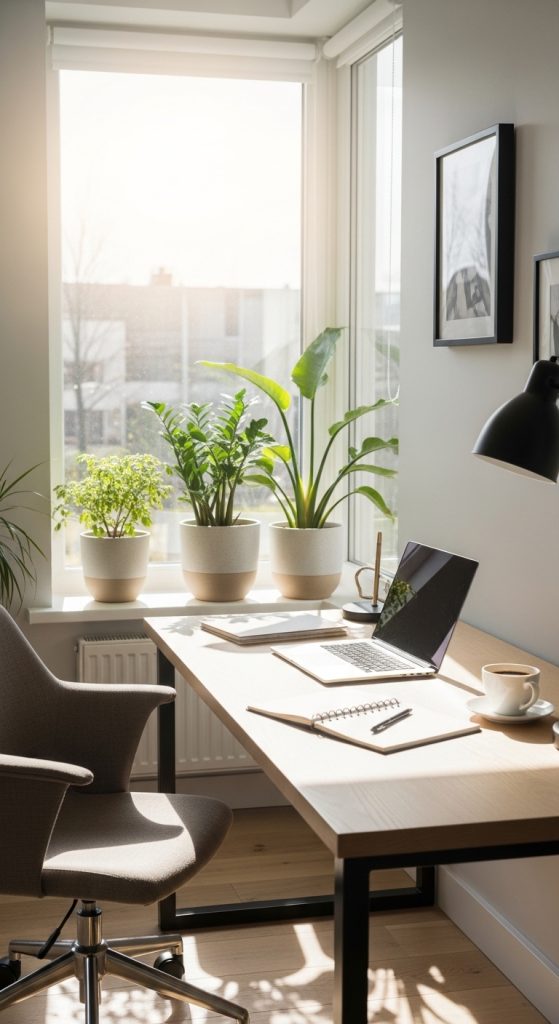
A natural light focused office design prioritizes daylight as the primary lighting source for the workspace. Natural illumination improves visibility and reduces eye strain during long working hours. Many Pinterest ideas highlight desks positioned near windows because sunlight enhances both productivity and aesthetic appeal.
Natural lighting also supports color accuracy and visual clarity. This is particularly beneficial for creative professionals who work with design materials or digital graphics. Exposure to daylight can also contribute to improved concentration and a more comfortable work environment.
This interior design concept emphasizes open layouts and unobstructed window areas. Heavy curtains or large furniture should not block sunlight from entering the workspace. Instead, the desk should be positioned so daylight spreads evenly across the working surface.
Natural light designs often combine simple decor with neutral colors. These elements reflect light and make the workspace appear brighter. Plants and natural materials such as wood surfaces are also commonly used in these setups to reinforce the connection between the workspace and the surrounding environment.
To create this setup, begin by identifying the room’s primary window. Place the desk perpendicular to the window so sunlight illuminates the workspace without creating glare on the computer screen. This orientation ensures balanced lighting throughout the day.
Install adjustable blinds or curtains to control brightness during peak sunlight hours. This prevents excessive glare while maintaining natural illumination.
Add a desk lamp to support evening work sessions when natural light is no longer available. Adjustable lamps allow users to direct light toward documents or keyboards.
Maintain clear space around the window to maximize light flow. Avoid placing tall storage units directly in front of the window. Instead, position shelves along side walls to maintain brightness throughout the room.
Idea 3: Vertical Storage Home Office
How to Create
Vertical storage systems are designed to maximize wall space while preserving floor area. In many homes, wall surfaces remain unused even though they offer valuable storage potential. Vertical organization uses shelves, pegboards, and wall-mounted cabinets to hold office materials in an efficient structure.
Pinterest inspiration frequently highlights vertical storage because it helps small home offices remain organized. Documents, books, and office supplies can be stored on shelves rather than stacked across the desk. This reduces clutter and improves workspace accessibility.

Vertical storage also creates visual organization. Items are arranged in clearly defined sections rather than scattered throughout the room. This structured layout helps users quickly locate materials during work sessions.
Another advantage of vertical storage involves flexibility. Shelving units can be rearranged as storage needs change. Containers and baskets can also be added to hold smaller items.
This approach works well for minimalist style offices where clean surfaces and efficient organization are essential. The result is a functional workspace that balances storage capacity with modern design.
To implement vertical storage, begin by selecting a wall near the desk. Install floating shelves at various heights to accommodate different materials. Lower shelves can hold frequently used items while higher shelves store reference materials or archived documents.
Use labeled storage boxes or baskets to group similar materials together. This simplifies organization and prevents items from becoming misplaced.
Pegboards can also be installed for storing small office tools such as scissors, rulers, or headphones. These systems allow tools to remain accessible without occupying desk space.
Maintaining vertical storage requires periodic organization. Review shelves regularly and remove unnecessary items to ensure the system remains efficient.
Idea 4: Corner Office Layout
How to Create
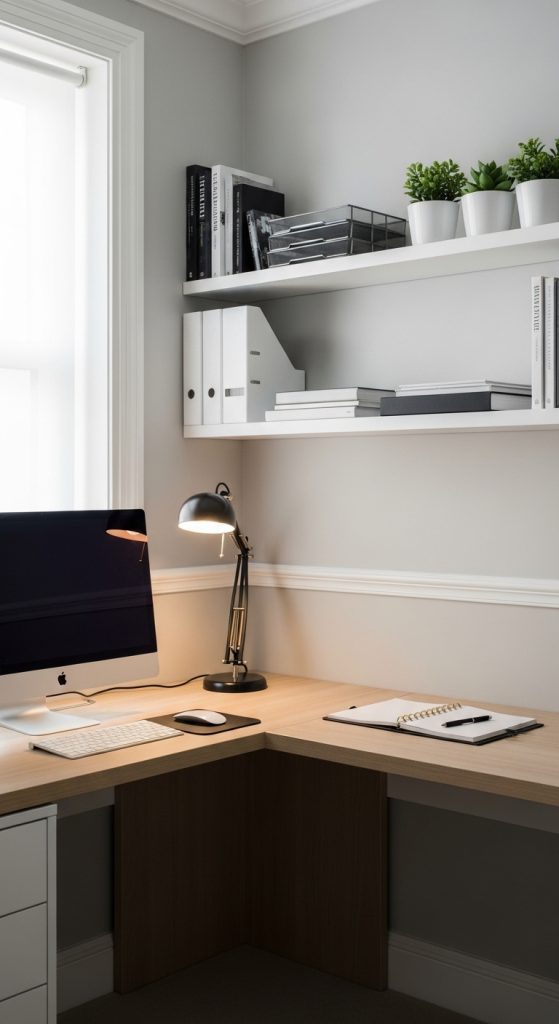
A corner office layout uses room corners to create a compact and efficient workspace. Corners often remain underused in interior design, yet they provide an ideal location for desks and shelving systems. Utilizing this space allows the rest of the room to remain open and uncluttered.
In many Pinterest ideas, corner desks are used to create focused work zones within larger rooms. The surrounding walls provide space for shelves, boards, or decorative elements that enhance productivity.
Corner layouts are particularly useful for small home offices. By positioning the desk in a corner, additional space becomes available for storage cabinets or seating areas. This layout also reduces visual distractions because the user faces a defined workspace area rather than an open room.
Corner office designs often incorporate vertical storage to maximize efficiency. Shelves placed above the desk provide space for documents and office tools while maintaining an organized environment.
The combination of compact layout and efficient storage makes the corner office an effective interior design solution for many home workspaces.
To create this layout, select a corner with access to electrical outlets for computer equipment. Position the desk so both sides of the corner remain accessible for shelves or storage.
Install floating shelves above the desk to hold books, folders, or decorative items. Ensure shelves are positioned high enough to avoid interfering with daily tasks.
Cable management systems should be installed along the back of the desk to keep cords organized. Desk drawers or small storage containers can hold writing materials and office accessories.
Regular cleaning and organization help maintain the functionality of the corner workspace. Keeping surfaces clear ensures the design remains practical and visually balanced.
Idea 5: Built-In Shelf Office Wall
How to Create
A built-in shelf office wall creates an integrated storage system that combines shelving and workspace elements along one wall. This design method transforms an entire wall into a structured storage and organization area.
In Pinterest inspiration boards, built-in shelving often frames the desk area. Books, office supplies, and decorative elements are stored neatly within shelves that surround the workstation.

This layout improves efficiency by keeping materials close to the desk. Users can reach documents, reference materials, or tools without leaving the workspace.
Built-in shelves also contribute to visual balance in interior design. When arranged carefully, shelves create symmetry and order within the room.
The concept works well in both large and small home offices because shelving height can be adjusted to match available space. Tall shelving units maximize storage while maintaining a clean aesthetic.
To build this system, begin by measuring the wall area where the desk will be positioned. Install shelving units on both sides of the desk space to create a framed appearance.
Use adjustable shelves so storage height can be modified when needed. Place frequently used materials within arm’s reach and store less frequently used items on higher shelves.
Storage boxes and labeled containers help maintain organization within the shelving system. This prevents shelves from becoming cluttered over time.
Lighting can also be added to shelves using small LED lights. These lights improve visibility while highlighting decorative elements.
Idea 6: Multi-Zone Productivity Office

How to Create
A multi-zone productivity office divides the workspace into different functional areas. Instead of placing all activities on one desk, the room is organized into separate zones for computer work, planning, storage, and creative thinking.
Pinterest inspiration frequently highlights this approach because it supports structured workflow. Each zone is designed for a specific purpose, which reduces clutter and improves task focus.
For example, the computer desk may serve as the primary work zone. A nearby table may function as a planning or brainstorming area. Shelving units may act as storage zones for documents and supplies.
This arrangement improves efficiency because materials are stored near the tasks where they are used. The design also encourages movement throughout the workspace, which can help maintain focus during long work sessions.
To create this layout, begin by mapping the room and identifying areas for each activity. Position the main desk near natural light sources. Place storage shelves nearby for quick access to documents.
Use rugs, lighting, or furniture placement to visually separate zones. For example, a small shelf unit can act as a divider between work and planning areas.
Maintain organization within each zone by grouping materials according to their function. This approach ensures the workspace remains efficient and easy to navigate.
Idea 7: Compact Small-Space Office

How to Create
A compact small-space office design focuses on maximizing efficiency in limited areas such as bedrooms, studio apartments, or shared living spaces. This layout emphasizes smart furniture choices and vertical organization to maintain productivity without requiring a full dedicated room.
Pinterest ideas often showcase compact workspaces that fit into corners, alcoves, or narrow wall sections. These setups use slim desks, wall shelves, and storage containers to keep materials organized. The goal is to create a structured work area without overwhelming the room.
Compact designs often follow minimalist style principles. Neutral color palettes and simple furniture help the workspace blend naturally with the surrounding home decor. This approach prevents the office area from appearing visually heavy within small interiors.
Another advantage of compact offices is their flexibility. Furniture can be rearranged easily if the space needs to be repurposed. The design therefore supports multiple functions within the same room.
To create this setup, begin by selecting a narrow desk that fits comfortably against a wall or in a corner. Install floating shelves above the desk to store documents and office tools.
Use stackable storage boxes or drawer organizers to maximize vertical storage capacity. These containers help keep supplies categorized and accessible.
Lighting is also important in compact spaces. A wall-mounted lamp or adjustable desk lamp ensures adequate illumination without occupying desk space.
Idea 8: Wall Organizer Command Center
How to Create

A wall organizer command center creates a centralized location for planning and organization within the home office. This design focuses on wall-mounted boards, shelves, and containers that hold important documents and planning materials.
Pinterest inspiration frequently features command centers that include pinboards, calendars, and document organizers. These systems allow users to visualize tasks, deadlines, and project plans in one location.
The command center is typically placed above or beside the desk so information remains visible during work sessions. This arrangement helps maintain organization and improves task management.
Wall organizers also reduce desk clutter because documents and notes remain stored vertically rather than spread across the workspace.
To create a command center, install a large board or wall panel above the desk area. Add small shelves or pockets to hold documents and notebooks.
Use clips or pins to display schedules, reminders, and project plans. This visual layout simplifies planning and keeps important information accessible.
Maintaining the command center requires regular updates. Remove outdated notes and reorganize materials as projects progress.
Idea 9: Neutral Color Home Office
How to Create

Neutral color palettes are widely used in home office interior design because they create calm and visually balanced environments. Colors such as white, beige, gray, and soft earth tones reflect light and help the workspace appear larger.
Pinterest inspiration frequently highlights neutral color offices paired with natural materials. Wooden desks, fabric chairs, and simple shelving units complement the color palette while maintaining warmth.
Neutral colors also reduce visual distractions. When the workspace environment remains calm, concentration improves. This is particularly useful for professionals who require long periods of focus.
The design also supports versatility. Neutral colors allow decorative elements to change without requiring major redesigns.
To create this setup, begin by selecting a neutral color scheme for walls and furniture. Choose simple desk and shelving units that align with the color palette.
Introduce texture through materials such as wood, woven storage baskets, or fabric accessories. These elements add visual depth without disrupting the calm atmosphere.
Lighting should be soft and balanced. Neutral environments often appear brighter when illuminated evenly.
Idea 10: Creative Inspiration Board Office
How to Create
A creative inspiration board office integrates visual planning tools into the workspace. Inspiration boards display images, sketches, notes, and creative ideas that guide ongoing projects. These boards are frequently featured in Pinterest workspaces because they combine organization with creativity.

The inspiration board usually sits above the desk or along a nearby wall. Materials displayed on the board may include project concepts, color palettes, reminders, or motivational references.
This design approach supports brainstorming and long-term project planning. When ideas remain visible, it becomes easier to refine them over time.
Inspiration boards also contribute to workspace aesthetics. Arranged carefully, they become decorative elements within the room while still serving practical functions.
To create an inspiration board, install a corkboard, magnetic board, or wire grid panel on the wall near the desk. Use clips or pins to attach notes, photos, and planning materials.
Organize the board into sections for different projects. This structure keeps ideas grouped and easy to review.
Update the board regularly by removing completed project notes and adding new inspiration sources.
Common Beginner Mistakes and How to Avoid Them
Many beginners attempt to design a home office without planning the layout carefully. This often results in overcrowded desks and inefficient storage systems. Measuring the room and planning furniture placement before setup helps prevent these issues.
Another mistake involves ignoring lighting conditions. Poor lighting can cause eye strain and reduce productivity. Combining natural light with adjustable task lighting improves visibility.
Some workspaces also lack proper organization systems. Without labeled containers or shelves, documents and office supplies become difficult to manage. Installing vertical storage solutions helps maintain order.
Avoid placing too many decorative items on the desk. Excess objects reduce workspace functionality. Maintaining a balance between decoration and practicality ensures the office remains efficient.
Practical Tips for Better Results
Maintaining an organized workspace requires consistent habits. One useful method involves grouping office materials by category. Documents, stationery, and digital accessories should each have designated storage areas.
Desk surfaces should remain clear except for frequently used tools. This improves focus and simplifies daily work routines.
Regularly reviewing storage systems also helps maintain efficiency. Removing outdated documents or unused supplies prevents clutter from accumulating.
Lighting adjustments can improve productivity. Position lamps to illuminate documents and keyboards without creating glare on screens.
Styling, Presentation, or Organization Ideas
A well-styled home office combines organization with visual harmony. Matching storage containers, neutral color palettes, and balanced furniture placement contribute to a cohesive appearance.
Wall art, plants, or framed prints can add personality without distracting from the workspace function. These elements should remain minimal to preserve a calm environment.
Shelves can be styled with both functional and decorative objects. Books, storage boxes, and simple decorations create visual structure while maintaining organization.
Budget or Time Planning
Designing a home office can be completed gradually to manage both time and budget effectively. Start by arranging essential furniture such as the desk and chair. Once the primary workspace is established, additional storage systems can be added step by step.
Budget planning should prioritize functional items that improve productivity. Shelves, desk organizers, and lighting often provide the greatest benefit.
Completing the project in stages allows adjustments to be made as the workspace evolves.
Creative Expansion and Advanced Inspiration
Once the basic home office design is complete, additional features can enhance the workspace. Adjustable lighting systems, ergonomic furniture upgrades, and expanded shelving systems improve comfort and functionality.
Creative elements such as digital planning boards or design software stations can also be integrated into the workspace.
Over time, the office can evolve into a personalized productivity hub that supports both professional work and creative projects.